The Cosmos Adventure - Contacts
Now that the crew has returned home safely, they can be reached at their normal email addresses. Joe Dorr can be reached by sending an email to joedorr@cosmosadventures.com.
OLD INFORMATION
The following is old information about how the crew communicated during the long passages. This information remains on this sight for documentation purposes.
The Iridium telephone number is +8816-3144-3498. The caller will be charged for an international call. MCI and Sprint each charge roughly $7 per minute. AT&T charges $1.95 per minute. We suggest you
check with your long distance carrier for rates before making a call.
The Cosmos will be able to receive email messages through the Iridium satellite telephone. Messages will be displayed on the Iridium satellite phone as text messages. Consequently, messages are limited to
120 characters. Messages longer than 120 characters will not be delivered. If you send an email message, be sure to turn off your email signature. Iridium text messages do not identify the sender so please
identify yourself in the 120 character text of your message. Iridium text messages are free to the Cosmos crew so this is the preferred method of communication. The Iridium email address for the Cosmos
is: 881631443498@msg.iridium.com.
The Cosmos crew also has access to email via a side band radio and PinOak, an Internet service provider. We are not publishing this email address since receiving email this way is extremely slow and very expensive. PinOak charges for every character sent or received. If you already have this email address and feel you must send a message please note the following:
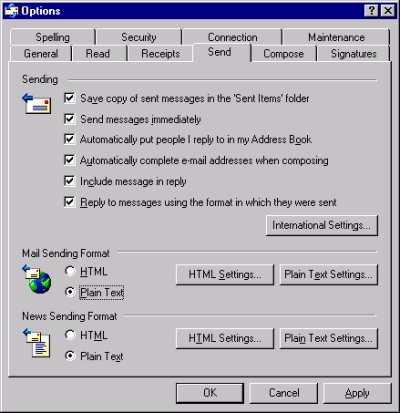
Most email packages include tons of formatting characters that do nothing at the Cosmos end. Some email packages have a plain text option that does not send these formatting characters. Outlook Express has the plain text option. To set plain text, go to the 'Tools' pull down menu, select 'Options' and 'Mail' --- click on the 'Send' folder and check the 'Plain Text' box in the 'Mail Sending Format' section of the folder. See figure below. Outlook Express comes with Microsoft's Internet Explorer so it is on most PCs. AOL and Compuserve do not support plain text.
If you want to send an email message to the Cosmos crew, send it to cosmos_crew@hotmail.com. The crew will check this mailbox when they are in port and have access to the Internet. If you send email to cosmos@shamrockmall.com, we review the message and either forward it through PinOak or place it in the HotMail mailbox for the crew review when they are able. Don't send emergency or urgent messages to either of these addresses since they are not monitored on a daily basis. Emergency or urgent messages should be sent to the Iridium satellite phone.
If you would like to ask questions of the crew, send the questions to cosmos_crew@hotmail.com. The crew will
reply when time and facilities permit
.
Visit the Cosmos Adventure Message Board where you can post messages, read other's messages, and/or reply to messages.